STEP 1 OF 4
Verify Your Number
Enter your name and phone number to get started.
Text this code to PrfctClaw via iMessage:
Tap the number to open iMessage with the code pre-filled, or text it manually. Then come back and tap Verify.
STEP 2 OF 4
Connect PitchPrfct
Enter your PitchPrfct API key so your assistant can access your contacts, campaigns, and workflows.
Find it at Profile → Developers API in your PitchPrfct dashboard
› Show me how to find it
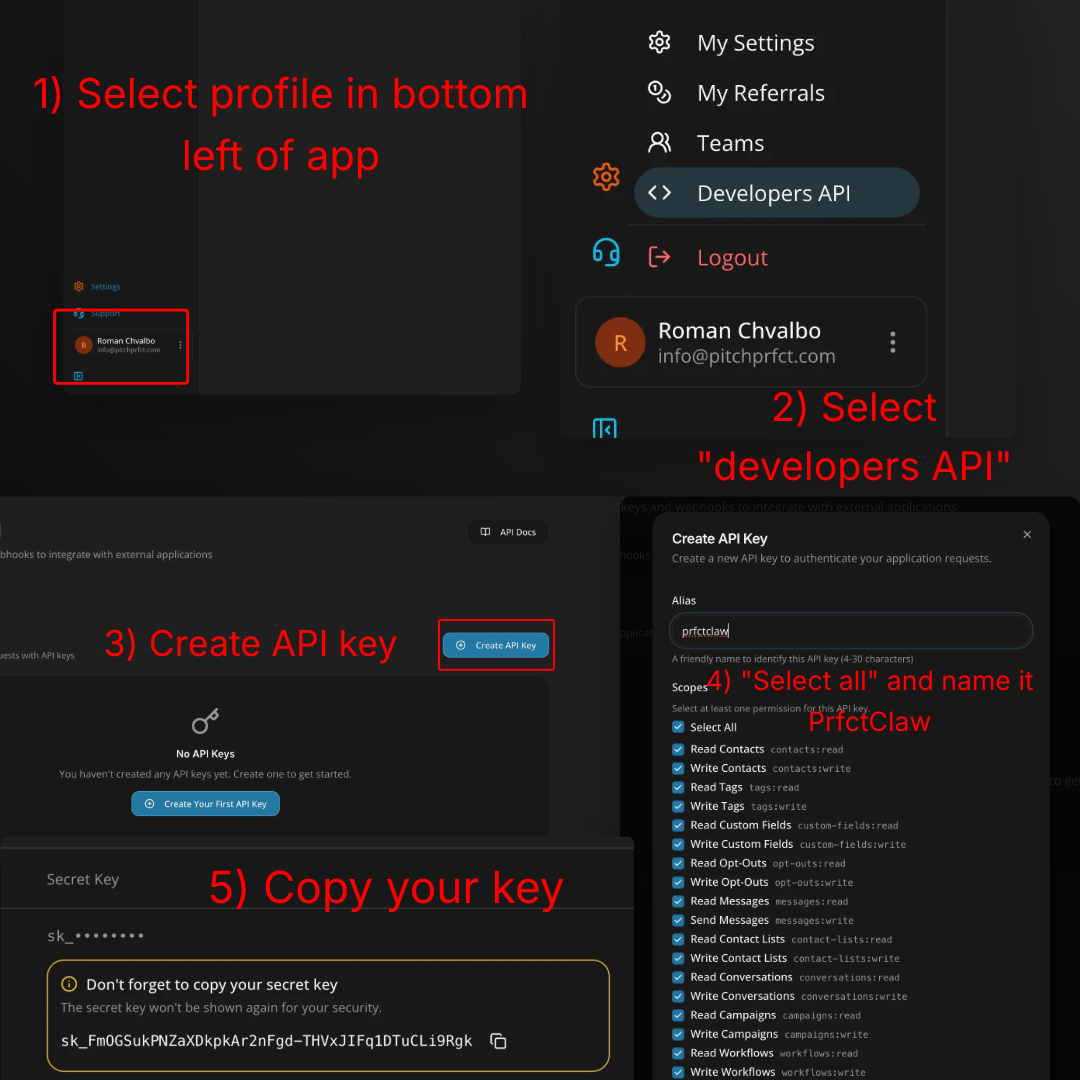
- In PitchPrfct, click your profile in the bottom-left.
- Choose Developers API.
- Click Create API Key.
- Name it PrfctClaw and tick Select All for scopes.
- Copy the secret key (it's only shown once) and paste it above.
STEP 3 OF 4
Connect Your Calendar
Let PrfctClaw check your availability and book appointments for you. You can always connect later.
STEP 4 OF 4
Make It Yours
Tell your assistant about you and how you'd like it to communicate. You can change this anytime.